
Vimにインデントハイライトのプラグイン(indentLine)を追加する(dein.vim利用)
2022-07-27
もともと、「動けばええやん」という考えの適当人間だったが、最近業務でコーディングをさせて貰えるようになり、「人様にコードを見せるためには、インデントとかちゃんとせな」という気持ちに。
そこで、Vimでインデントを見やすくしたかったので、プラグインを追加してみた
プラグインは色々ありそうだったが、indentLine がGithubのスター数が多かったので、indentLine に決定
https://github.com/Yggdroot/indentLine
Contents
indentLineのインストール
以下の★部分が.vimrcに追記した部分
今回、dein.vimを使って自動インストールするので、Readmeに書いてあるような事前インストール不要
参考:最低限の労力で、MacにVimのパッケージ管理ツールdein.vimと、入力補完プラグインddc.vimのインストールする
参考:最低限の労力で、MacにVimのパッケージ管理ツールdein.vimと、入力補完プラグインddc.vimのインストールする
「set shiftwidth=【インデントするスペース数】」も忘れずに記載しておく
% cat ~/.vimrc

"dein Scripts-----------------------------
if &compatible
  set nocompatible               " Be iMproved
endif

" Required:
set runtimepath+=$HOME/.cache/dein/repos/github.com/Shougo/dein.vim

" Required:
call dein#begin('$HOME/.cache/dein')

" Let dein manage dein
" Required:
call dein#add('$HOME/.cache/dein/repos/github.com/Shougo/dein.vim')

" Add or remove your plugins here like this:
" call dein#add('Shougo/neosnippet.vim')
" call dein#add('Shougo/neosnippet-snippets')

" Ddc:
call dein#add('Shougo/ddc.vim')
call dein#add('vim-denops/denops.vim')
call dein#add('Shougo/ddc-around') " filter
call dein#add('Shougo/ddc-matcher_head') " filter
call dein#add('Shougo/ddc-sorter_rank') " filter
call dein#add('Shougo/ddc-nextword') " source

" Indent:
call dein#add('Yggdroot/indentLine') " ★追記部分

" Required:
call dein#end()

" Ddc:
call ddc#custom#patch_global('sources', ['around', 'nextword'])
call ddc#custom#patch_global('sourceOptions', {
      \ 'around': {'mark': 'A'},
      \ 'nextword': {'mark': 'nextword'},
      \ '_': {
      \   'matchers': ['matcher_head'],
      \   'sorters': ['sorter_rank']},
      \ })
call ddc#enable()

" Indentline:
let g:indentLine_setColors = 0 ★追記部分
let g:indentLine_color_term =239 ★追記部分
let g:indentLine_color_gui = '#A4E57E' ★追記部分
let g:indentLine_char = '¦' ★追記部分

" Required:
filetype plugin indent on
syntax enable
" syntax on

" If you want to install not installed plugins on startup.
if dein#check_install()
  call dein#install()
endif

"End dein Scripts-------------------------


set number
set title
set paste
set ambiwidth=double
set tabstop=4
set expandtab
set shiftwidth=4 ★スペース何文字でインデントしたいか設定しておく
set smartindent
set list
set nrformats-=octal
set hidden
set history=50
set virtualedit=block
set whichwrap=b,s,[,],<,>
set backspace=indent,eol,start
set wildmenu
動作確認
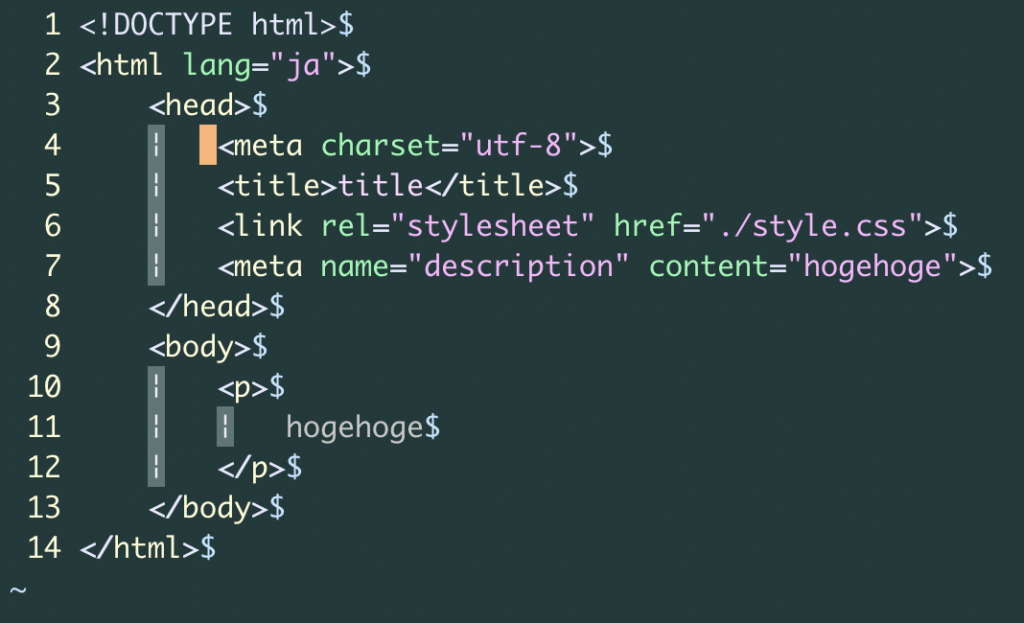
あとは、Vimを立ち上げ直すと、無事にインデントがハイライトされている
以上。